



 128
128
In case you don’t remember your password for the application procureONE, please follow the instructions:
01. Visit the page you are trying to login https://buysite.marketsite.gr.
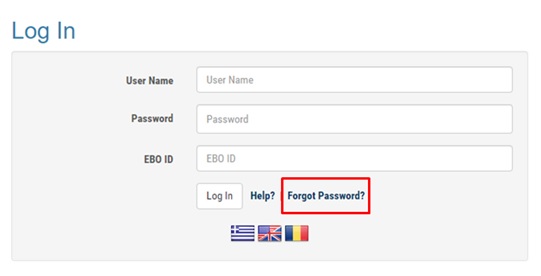
02. Click on the English Flag and then select the link 'Forgot Password?' as in the picture below.
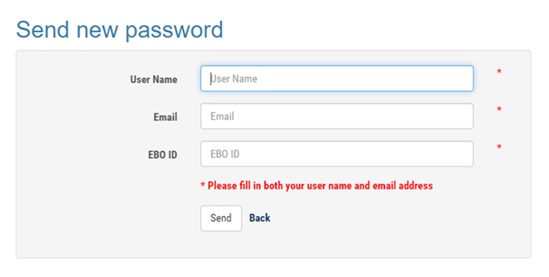
03. Fill in the required fields and select the button 'Send'.
04. As soon as the procedure has been completed, the following message will be displayed:
A new password has been sent. Please check your email for further information. Press OK.
If any of the details that you have been inserted are not correct, the following message will appear:
The data you entered do not correspond to a valid user in the system.
Check your details or if you don’t remember, please contact cosmoONE customer support.
05. After the message displayed, in a short period of time you will receive the following email with the new password:
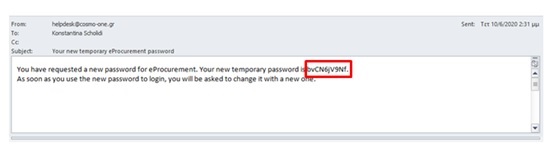
06. Login with the new password. A new message is displayed:
Please change your password. After this initial login, you will continue to use the password selected at this time. Press OK.
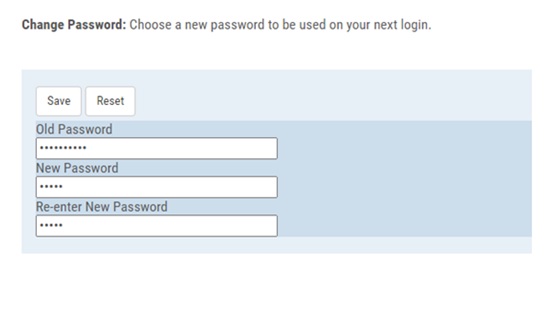
On the screen ‘Choose a new password to be used on your next login.’ Type:
In the field 'Old Password', fill in the password you have received via email.
In the field 'New Password', fill in the new password you wish to have.
In the field 'Fill in the new password', you will repeat the new password you wish to have.
Press the button 'Save'.
07. After the 'Save' button a message is displayed: ‘Password successfully changed.’
Then it directs you to the home page of the platform.

