



 25
25
📺 Watch the related video/gif for step-by-step guidance on modifying the email addresses that receive notifications for new tenders.
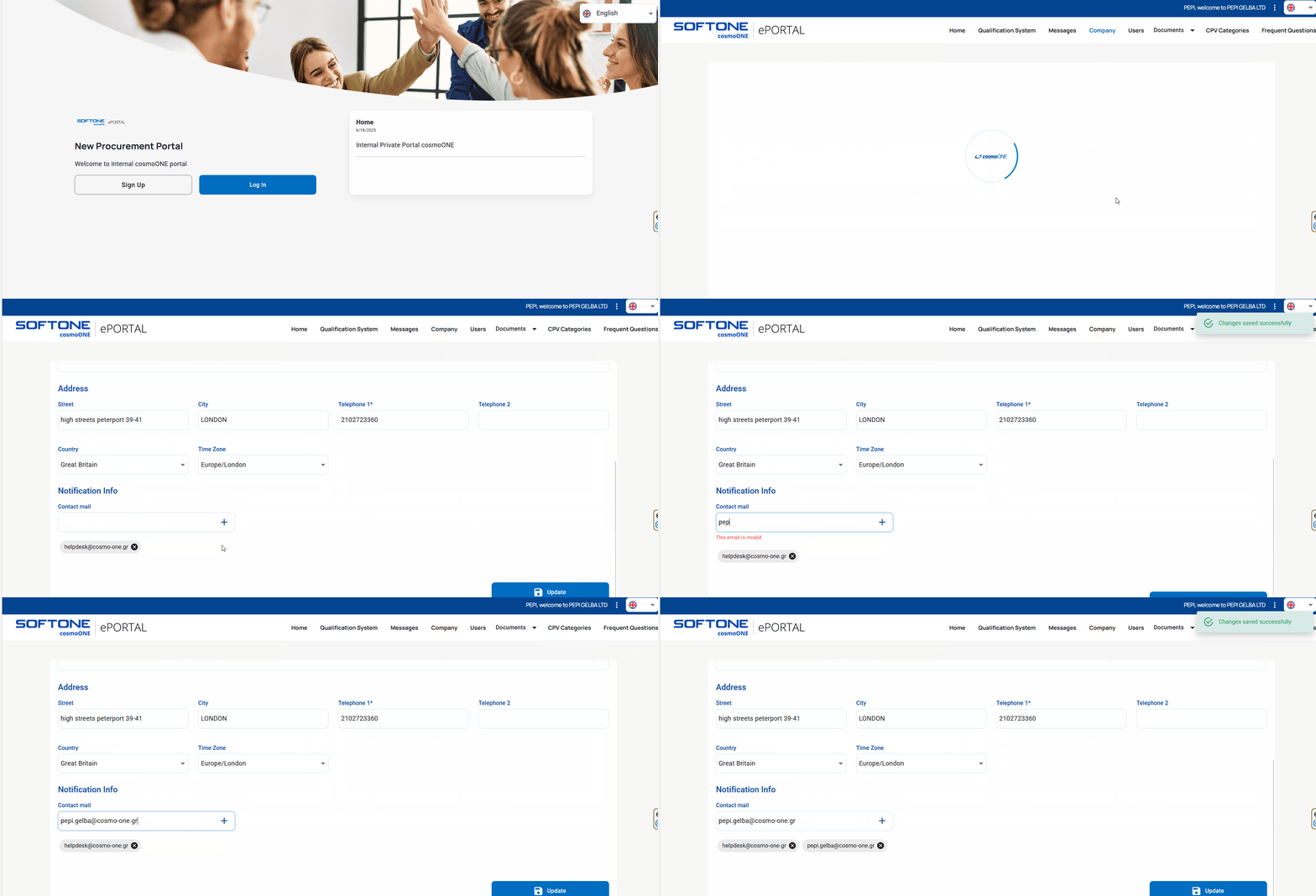
➤ Step-by-step instructions:
1. Log in to the platform using your credentials
2. From the main menu, navigate to the “Company” menu.
3. Scroll down to the to the “Notification Info” section.
4. Find the “Contact Email” field and follow these steps:
- To remove an email address, simply click the X icon.
- To add a new email address, type it in the provided field and click the + button.
5. Click Update to save changes.
⚠️ These email addresses will receive notifications from eSource regarding new tenders and approaching submission deadlines.
Kindly note that for tenders to which your company has been invited, all initial notifications and related correspondence from contracting authorities will be directed to the email addresses provided here.
Once a user from your company takes any action on a tender (for example, clicking “I want to participate” in a public tender or submitting a question through the communication, all subsequent notifications related to that tender will be sent exclusively to the user who most recently acted on the tender.
After the tender response has been submitted, all future notifications will be directed to the user who submitted the response, regardless of whether other users from your company take any further actions.

