



 26
26
The "Expiring Documents" tab provides a comprehensive overview of all documents, including their respective categories and expiration dates. This enables users to monitor pending actions in accordance with the procedures established by the Contracting Entity. Additionally, users may receive notification emails (from the Contracting Entity) regarding documents approaching their expiration.
📺 Watch the related video/gif for a step-by-step guide on how to view your expired documents.
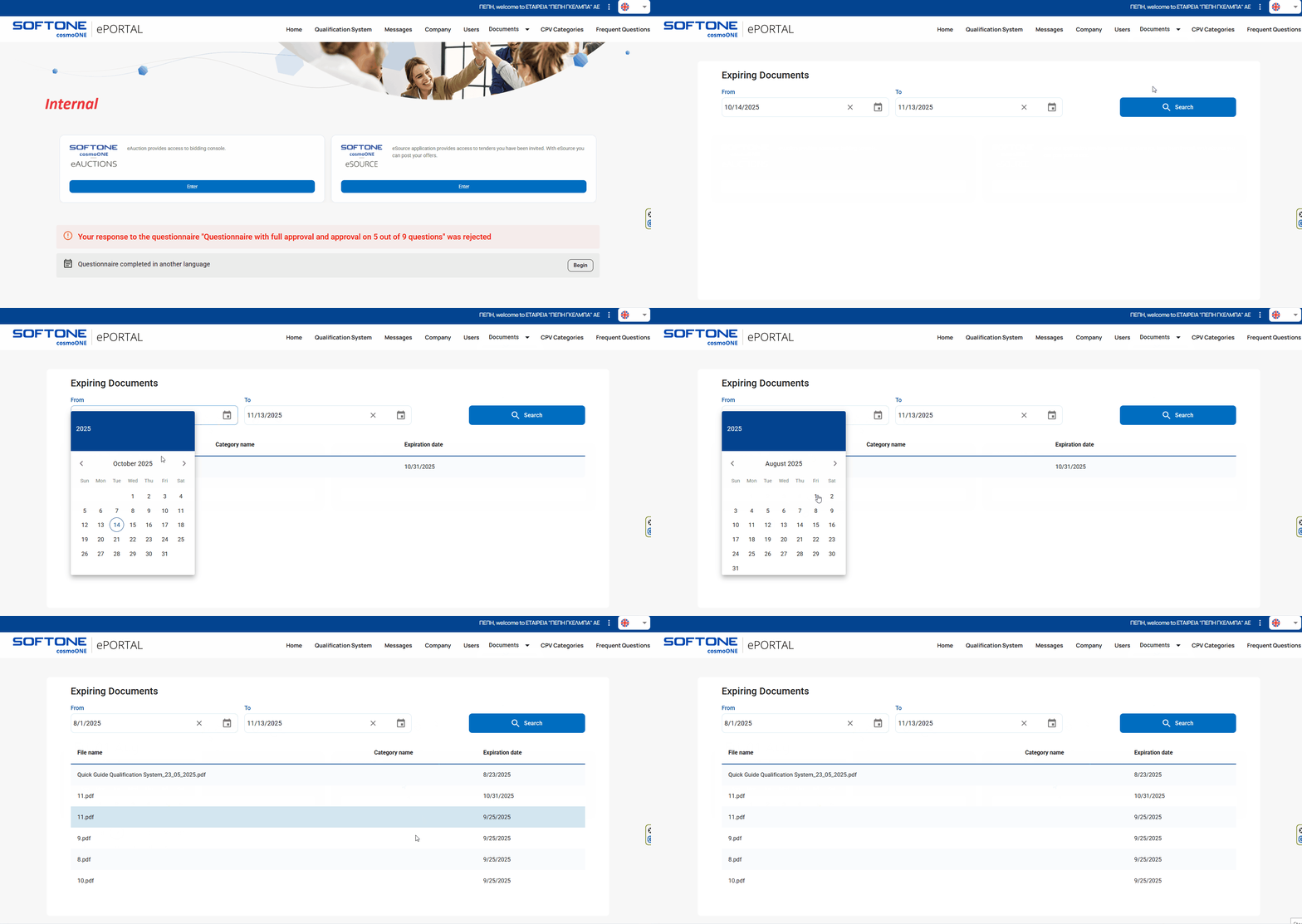
➤ Step-by-step instructions:
1. From the main menu, click on “Documents”.
2. Please select “Expiring Documents”.
3. You can search for the files using the filters provided in the search engine.
4. Set the start date in the “From” field by selecting a date from the calendar or typing it in the format DD/MM/YYYY. Use the calendar icon for convenience. If needed, click the ✕ to clear the current selection.
5. Set the end date in the “To” field, following the same instructions as for the “From” field.
6. Click Search. Each row corresponds to a file.
For detailed instructions on the file upload process, please refer to the article:
👉 How can I view and upload files to a folder.

