



 18
18
👉 This article is linked to the article: Which options are available in the “Qualification System” menu?
Through the “Qualification system”, users with the appropriate rights can evaluate supplier applications for inclusion in specific category groups.
📺 See the related video/GIF for step-by-step guidance on evaluating an application for inclusion in a category group.
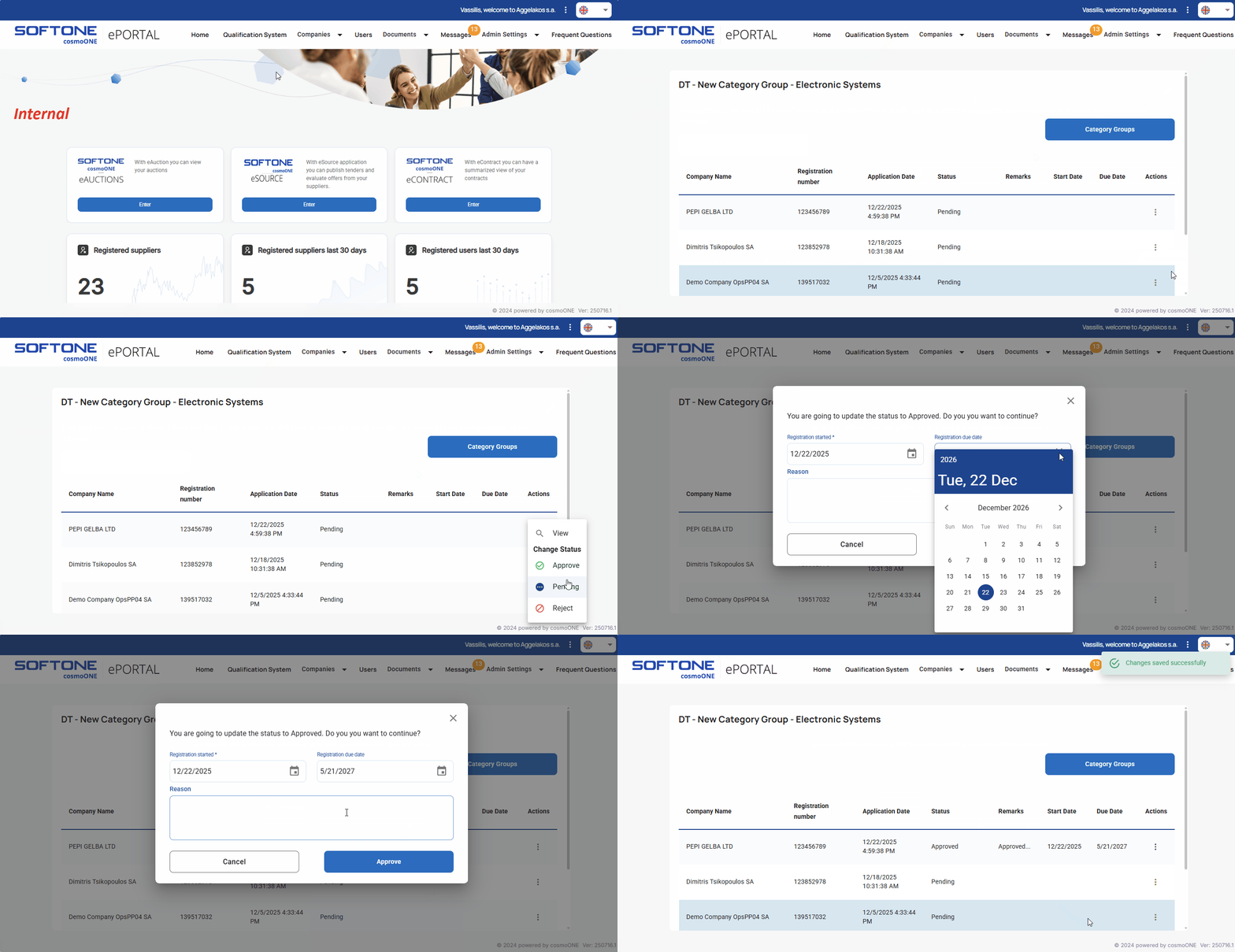
➤ Step by step instructions:
1. Go to the “Qualification System”.
2. Find the desired category and from “Actions” column click the three vertical dots (⋮) on the right side.
3. From the pop-up menu please select View.
4. On the new screen, please locate the supplier’s application that you wish to evaluate and in the “Actions” column click the three vertical dots (⋮) on the right side.
5. From the pop-up menu for evaluating applications, you can choose:
- Approve ✅
In the confirmation window that appears, please fill in the “Registration started” and optionally the “Registration due date” and “Reason” fields. Then click the Approve button to complete the process. Once approved, the company is successfully added to the category group. - Pending 🔵
In the pending window that appears, you may optionally enter a “Reason”. Click the Pending button to complete the process. The application will remain pending until additional information is collected, or a final decision is made. - Reject ❌
In the rejection window that appears, enter a “Reason” and click the Reject button to reject the application. The application will be rejected, and the company will not be included in the category group.

